Making Sense of Modern IT Support for Your Home and Business
What Does IT Support Actually Cover?
When something goes wrong with your computer, network, or security system, the first question is usually who to call. IT support has grown far beyond fixing a slow laptop or resetting a password. For both homes and small businesses, the range of services now includes everything from setting up a reliable internet connection to installing surveillance cameras and managing entire networks remotely. Understanding what these services involve helps you know what to look for when you need help.
Many people assume IT support is only for large companies with complex server rooms. In reality, residential and small-business needs are often just as demanding. A home office might rely on a stable fibre optic connection for video calls, while a retail shop needs CCTV that works reliably and stores footage securely. The same provider that handles a home network can often manage a business network too, because the fundamentals are similar: good hardware, proper configuration, and someone to call when things break.
Network Setup and Troubleshooting
Networks are the backbone of modern connectivity. A poorly set up router or a weak Wi-Fi signal can make even the fastest internet connection feel slow. Professional network support typically starts with an assessment of your space. Walls, floors, and interference from other devices all affect signal strength. A technician might recommend repositioning the router, adding a mesh system, or running ethernet cables to key locations.
For businesses, the stakes are higher. A dropped connection during a transaction or a video conference can cost time and money. Network support includes configuring switches, setting up guest networks, and ensuring that traffic from cameras and point-of-sale systems does not slow down other users. Regular maintenance, such as firmware updates and security checks, helps prevent problems before they start.
Fibre Optic Connections
Fibre optic internet is becoming the standard for both homes and businesses because it offers higher speeds and more reliable connections than older copper-based lines. However, fibre requires specific equipment and installation practices. The fibre cable itself is fragile, and the modem or optical network terminal (ONT) must be placed correctly to avoid signal loss. A technician who understands fibre can ensure the connection is stable and that the internal network is set up to take full advantage of the speed.
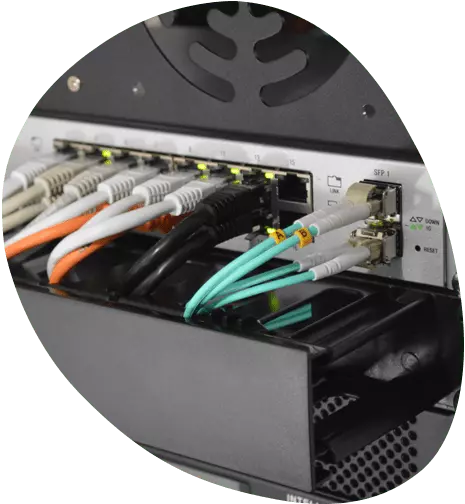
One common issue is that people pay for a fast fibre package but then use outdated routers or poor cabling inside their home or office. The bottleneck shifts from the street to the internal network. Good IT support will check the whole chain, from the ONT to the device in your hand, and recommend upgrades where needed.
CCTV and Security Systems
Security cameras have become affordable and easy to use, but setting them up properly still requires some know-how. A camera pointed in the wrong direction, or one that records only when motion is detected but misses the key area, is not much use. Professional installation includes positioning cameras to cover entry points and valuable assets, running cables or setting up Wi-Fi connections, and configuring recording schedules or cloud storage.
Network security is another layer. Cameras that connect to the internet can be vulnerable if not properly secured. Default passwords, unpatched firmware, and open ports are common weak points. A good IT provider will set up cameras on a separate network segment, enable encryption, and ensure that remote viewing is done through a secure app or portal. For businesses, compliance with data protection rules may also factor into how footage is stored and accessed.
The phrase "Heev It services" often comes up when people look for a single provider who can handle both their network and security needs. Having one team manage everything from the fibre connection to the cameras simplifies troubleshooting. If something goes wrong, you do not have to figure out whether the issue is with the internet provider, the camera manufacturer, or the cabling. One call covers it all.
Remote and Onsite Support
Not every problem requires a technician in the same room. Remote support allows a technician to connect to your computer or network from their office and fix software issues, update drivers, or reconfigure settings. This is fast and often cheaper than an onsite visit. For simple problems like a printer that will not print or a program that crashes, remote support can resolve the issue in minutes.
On the other hand, some problems need hands-on work. A broken laptop screen, a faulty network port, or a new server installation requires someone to be physically present. Good IT support offers both options and helps you decide which one makes sense. For example, if your internet is down completely, remote support cannot help because there is no connection to work with. An onsite visit is necessary to diagnose the hardware or cabling.

Managed IT Support
Managed support is a subscription-style service where a provider monitors and maintains your systems proactively. Instead of waiting for something to break, the provider checks for issues regularly, applies updates, and responds to alerts. This approach is popular with small businesses that do not have a full-time IT person on staff. It gives predictable costs and reduces downtime.
A managed support plan might include antivirus management, backup monitoring, network performance checks, and helpdesk access for employees. The provider keeps an inventory of your hardware and software, so they know what is in use and what needs upgrading. For residential users, managed support is less common but can be useful for home offices or smart homes where reliability matters.
Laptop and Device Repairs
Laptops and desktop computers eventually need repairs. Common issues include cracked screens, failing hard drives, dead batteries, and slow performance caused by malware or too many programs running at startup. A repair service can replace parts, clean the system, or reinstall the operating system. For older devices, the repair technician can advise whether fixing the problem is worth the cost compared to buying a new machine.
Heev IT is also on YouTube.
Data backup is a critical step before any repair. A good technician will always ask whether you have a recent backup before they start working. If not, they can help you back up your files first. This is especially important for businesses where losing data means losing work and possibly violating client agreements.
Choosing the Right IT Support
Not all IT support providers are the same. Some specialise in residential customers, others focus on businesses, and many try to serve both. When evaluating a provider, consider the range of services they offer and whether they can handle the specific technologies you use. If you have fibre optic internet, check that they understand fibre installation. If you run a business with multiple employees, ask about managed support plans and response times.
Another factor is whether the provider offers both remote and onsite options. Some problems are solved faster remotely, but for hardware repairs or major installations, onsite support is essential. A provider that only works remotely may not be the best choice if you have physical equipment that needs attention.

It is also worth asking about their experience with security systems if you need CCTV installation or maintenance. Network and security are increasingly linked, and a provider who understands both can design a system that works well and stays secure.
For those in the Cape Town area, Heev IT provides residential and business IT support, including network, fibre optic, CCTV, remote, onsite, managed support, and laptop repair services. They can be reached at +27 21 879 3044 and are based in Cape Town, Western Cape.